

You’ve designed a beautiful user interface. Now, it’s time to make it work. Workflows are the engine of your application—they are the logic that runs when a user interacts with your UI. Whether you’re submitting a form, navigating to a new page, or fetching data from an API, everything is handled by a workflow.
The Core Concepts
Every workflow in Saasio is built on three simple concepts:The Trigger
This is the event that starts the workflow. Most commonly, it’s a user
interaction, like clicking a button, submitting a form, or a page
finishing loading.
An Action
An action is a single, specific operation. It’s one step in your workflow,
such as “Go to page”, “Create new data”, or “Set data in state”.
A Workflow
A workflow is simply a sequence of one or more actions that are executed in
order when a trigger occurs.
Building Your First Workflow: Page Navigation
Let’s create the most common workflow: making a button navigate to another page when clicked.1
1. Select the Trigger Element
On the canvas, select the element that will trigger the workflow. In this case, it’s our Button element. A selected element will have a blue outline.
2
2. Open the Logic Tab
With the button selected, click on the Logic tab in the top navigation
bar. This opens the workflow editor for the selected element’s default trigger
(for a button, the trigger is “On Click”).
3
3. Choose and Configure the Action
We want to navigate, so:
- Open the Navigation category.
- Select the “Go to page…” action.
- A configuration panel will appear. In the
Select a pagefield, select your desired destination page from the dropdown.
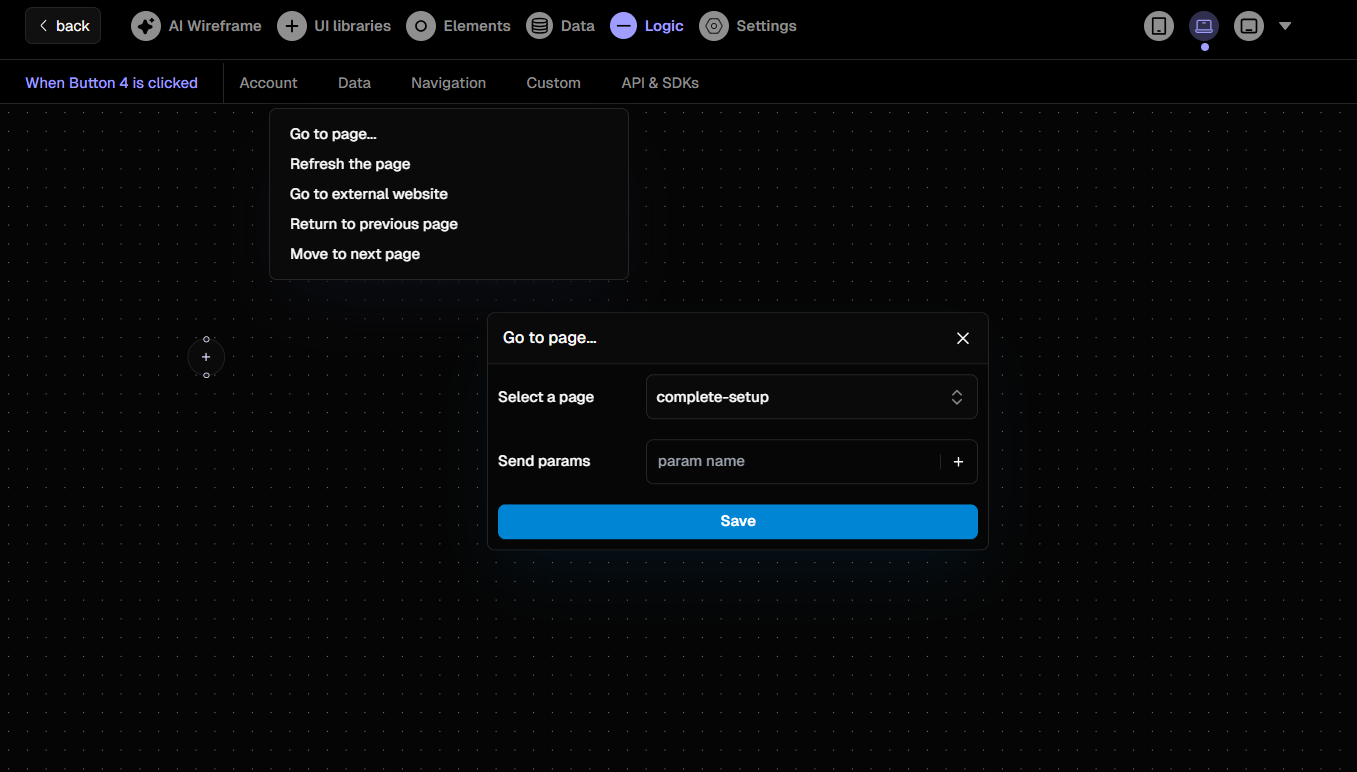
Configuring a 'Go to page' action in the Logic tab.